Entrepot360.ca
FREN
Try the demoDemo

Warehouse software · food banks and Moisson regional food banks

Still running your warehouse in Excel?

A spreadsheet doesn’t scan anything, doesn’t know where the pallet is, and won’t warn you that a product expires on Thursday. Entrepot360.ca does: every donation received, its date and its place, from the dock to the hamper handed out. On the phone and at the office, everyone sees the same thing at the same moment — and the spreadsheet can finally retire.

We set it up at your site. Your racks measured, your labels ready to put up, your catalogue imported, your team trained: you start with a warehouse that’s ready, not with empty software.

Proven by one of the largest food banks in Québec

  • Nothing to install
  • No device to buy
  • Application in English and in French · Français
  • Hosted in Canada
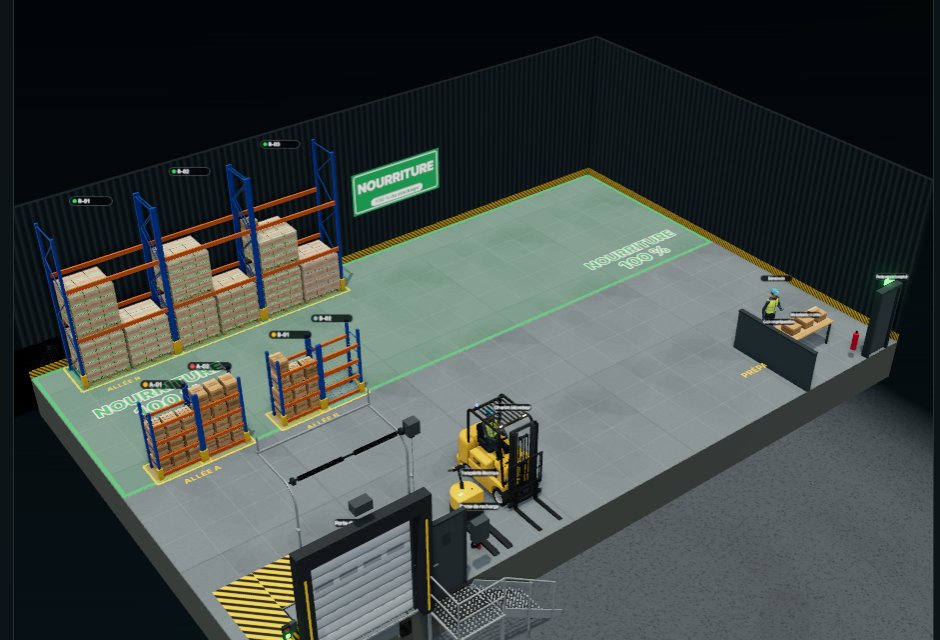
The warehouse in three dimensions, to scale: the pallet rack, the shelving of aisles A and B, the forklift and the receiving dock
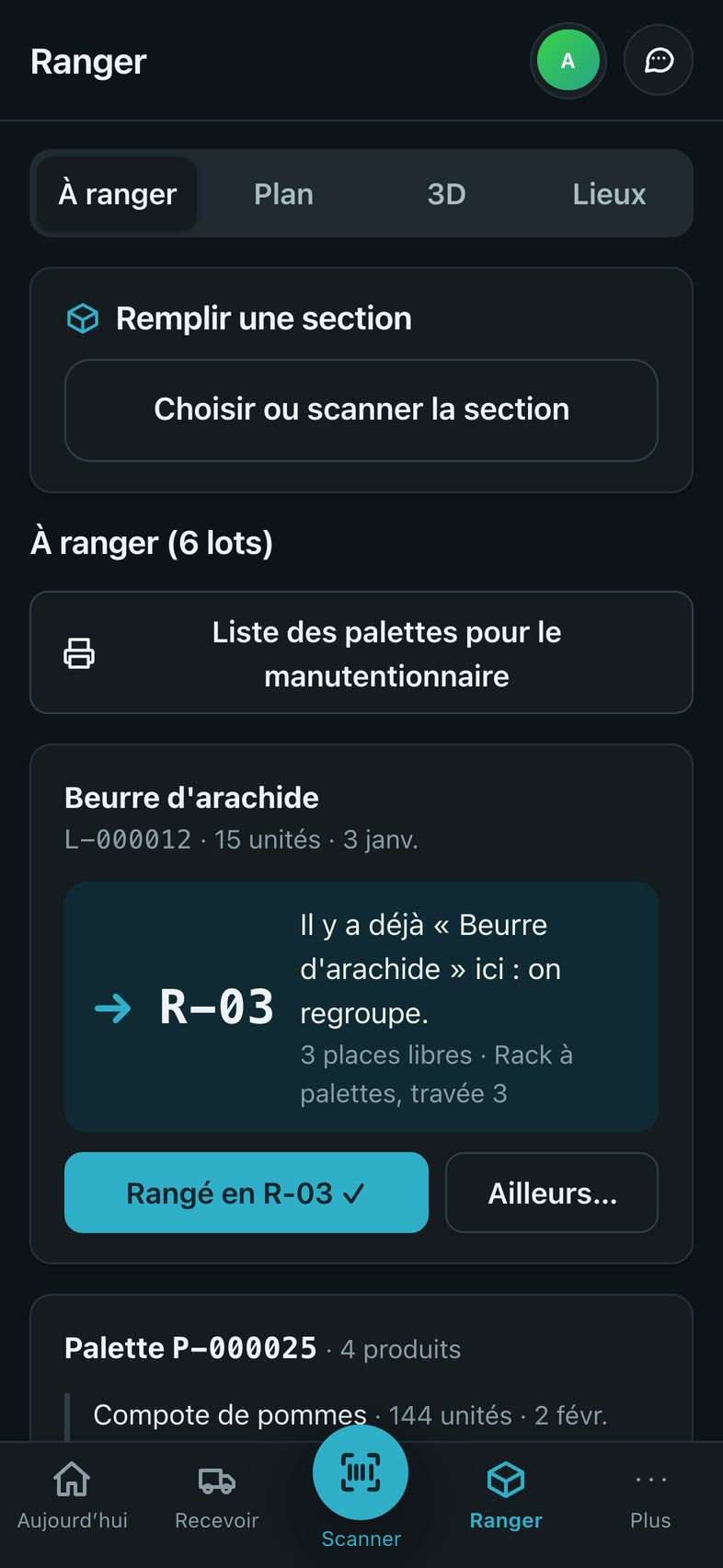
On an iPhone, the Put away screen suggests a place for each lot
Set up for youWe measure your racks, prepare your labels, import your catalogue and train the team. Nothing to install: a web address, and you scan.
The phone is the scannerThe camera of an iPhone — or an Android phone — reads the barcodes. No scanner to buy.
4 profilesDock, manager, management, administration: each has its own screens.
A copy every dayAutomatic backup. One click is all it takes to go back.
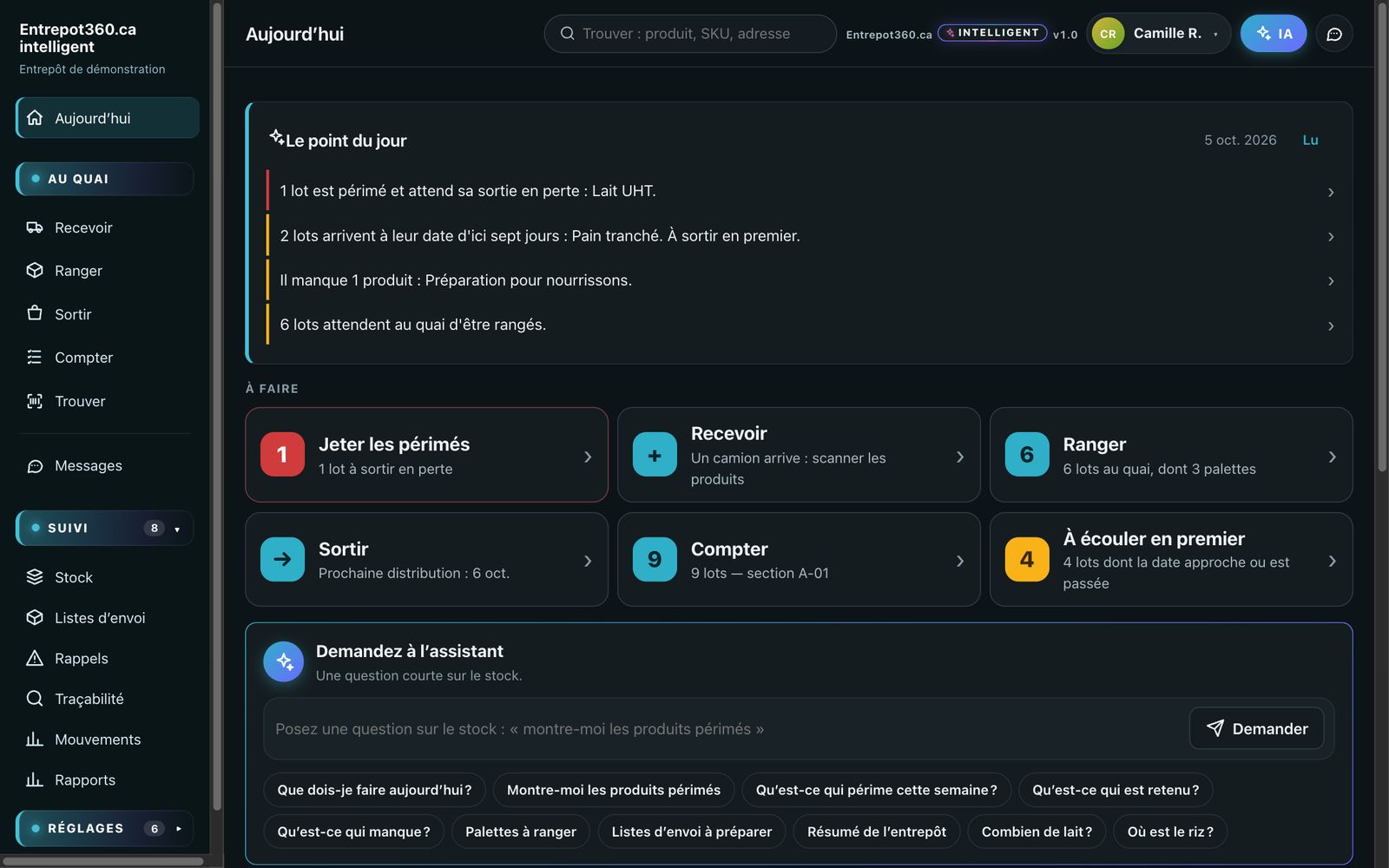
The morning screen: today’s briefing reports one expired lot, two lots to use soon and one product missing; below, the tasks to do

Every morning, the screen says what needs doing, in order: what is missing, what is waiting at the dock, what to pick.

Your warehouse’s digital twin

Watch it move.

Digital twin n. — A faithful copy of your warehouse on screen, in three dimensions: same measurements, same racks, same pallets. It follows the real stock with every scan: what you see there is what is on the floor.

The truck backs up to the dock, the driver unloads the pallet, the forklift picks it up and lifts it into the rack — along the real aisles, to the real measurements of your building.

  • The delivery and the forklift in action, started with one button in the digital twin.
  • An aisle too narrow for the forklift? You see it before moving a single rack.
  • For training, presenting to the board, or planning a new layout.

Does this sound like your warehouse?

Today

  • You find an expired product when you empty the shelf.
  • “Is there any left?” — someone goes to the back to check.
  • The office spreadsheet doesn’t say the same thing as the pallets.
  • A recall notice comes in: nobody knows where the lot went.
  • The new volunteer doesn’t know where to put things away.
  • You look for a pallet: it was moved, and nobody wrote it down.
  • The annual inventory closes the warehouse for two days.
  • The report for the board is redone by hand, every month.
  • Everything rests on one person’s memory.
  • You order what you already had, and run out of what you thought you had.

With Entrepot360.ca

  • The morning briefing flags what is about to expire, seven days ahead.
  • Type the product’s name: its section, its quantity and its date appear.
  • Stock updates with every scan; the office sees right away what the dock has just done.
  • Traceability shows where the lot came from and who it went to.
  • The application suggests the place; you confirm with one tap.
  • Every pallet has its address; a move is scanned.
  • You recount one section a week, without closing anything.
  • The report for the period comes out in one click, to Excel.
  • Everything is recorded: anyone can find, put away and pick.
  • A threshold per product flags what to order, before you run out.

A day with Entrepot360.ca

Four actions on the phone. The rest takes care of itself.

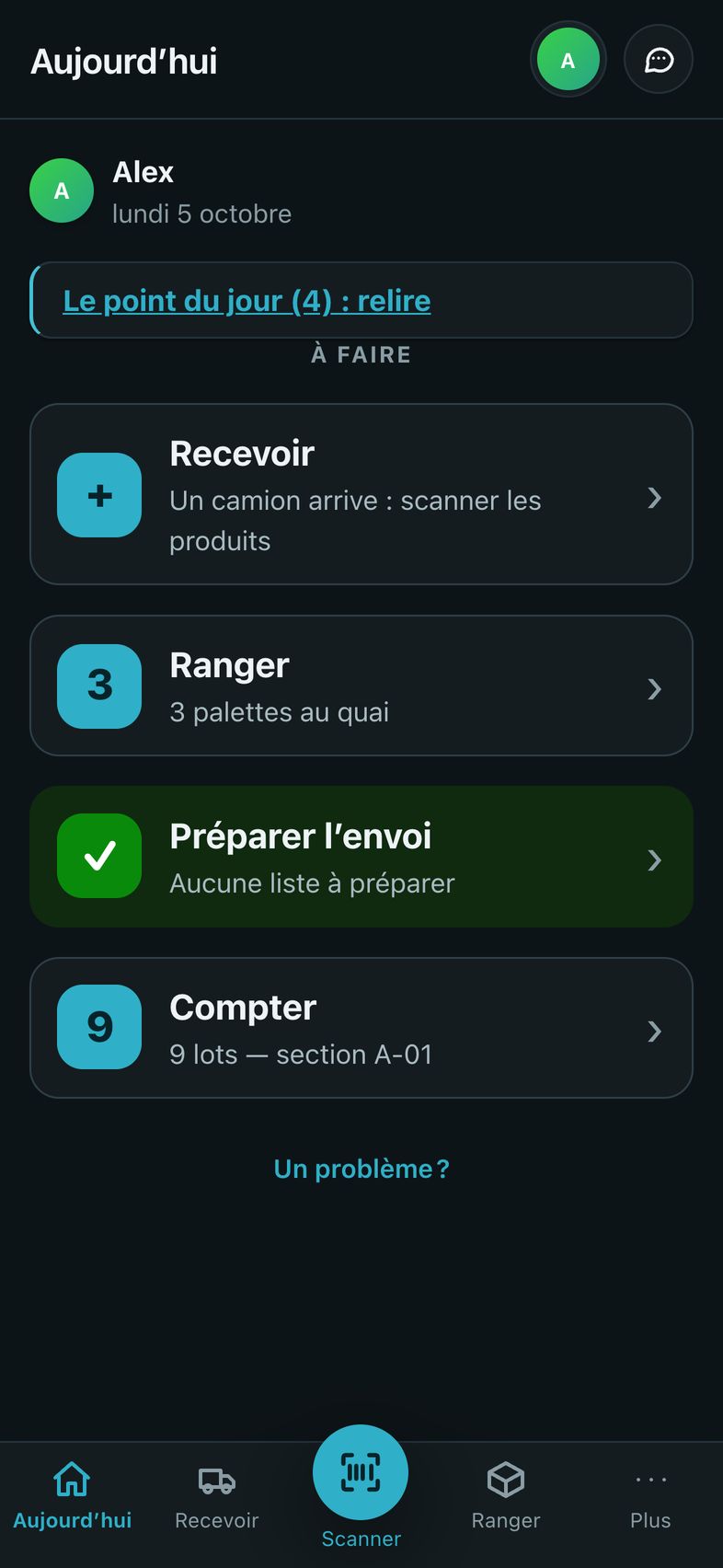
  1. The warehouse worker’s home screen: Receive, Put away, Prepare the shipment, Count

    7:30 a.m. · Today’s briefing

    What to do, and in what order.

    One main action per screen, large buttons, the number of tasks waiting. You know where to start, without having to ask.

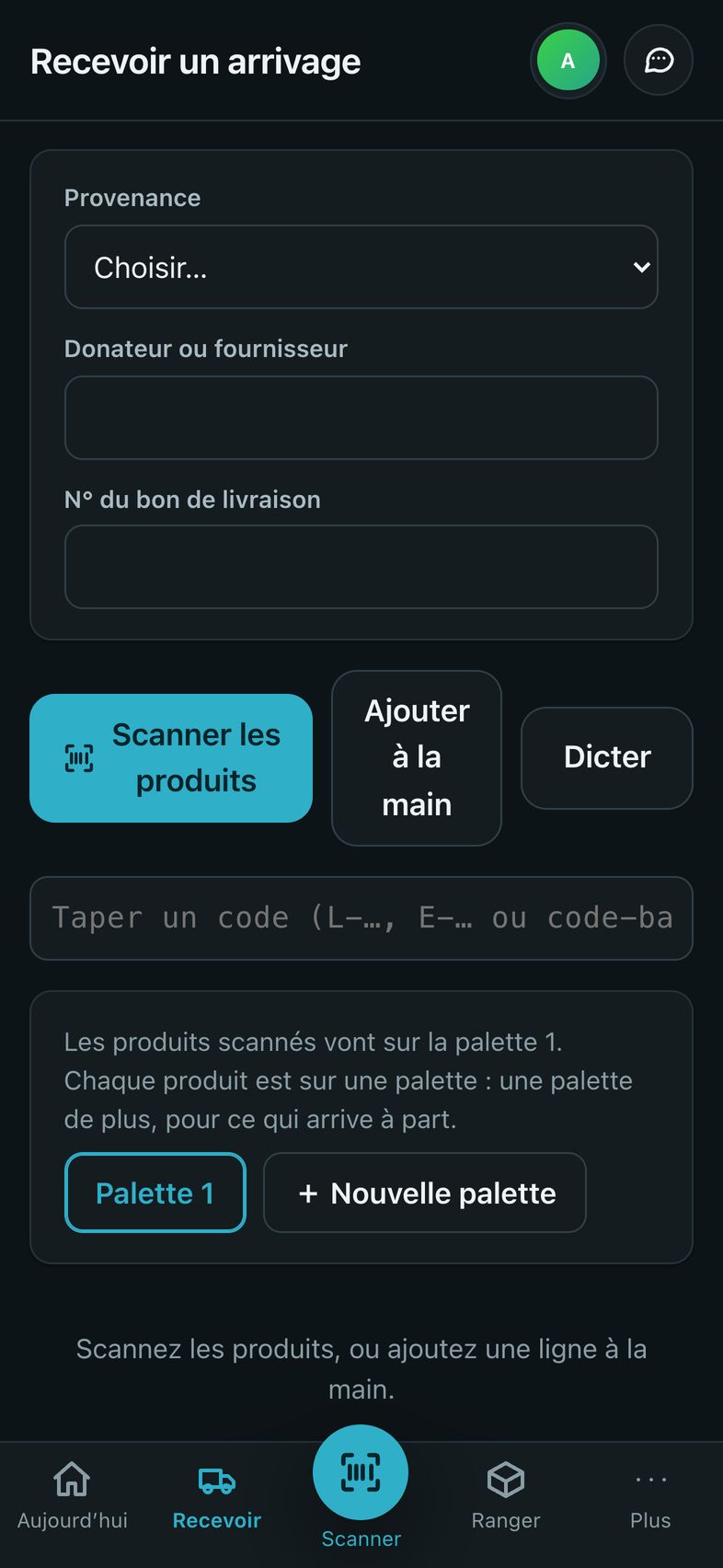
  2. The Receive a delivery screen: source, donor, and the Scan the products button

    9:00 a.m. · The truck arrives

    You scan, pallet by pallet.

    The source, then each product. A barcode that won’t read? Add the line by hand, or dictate it.

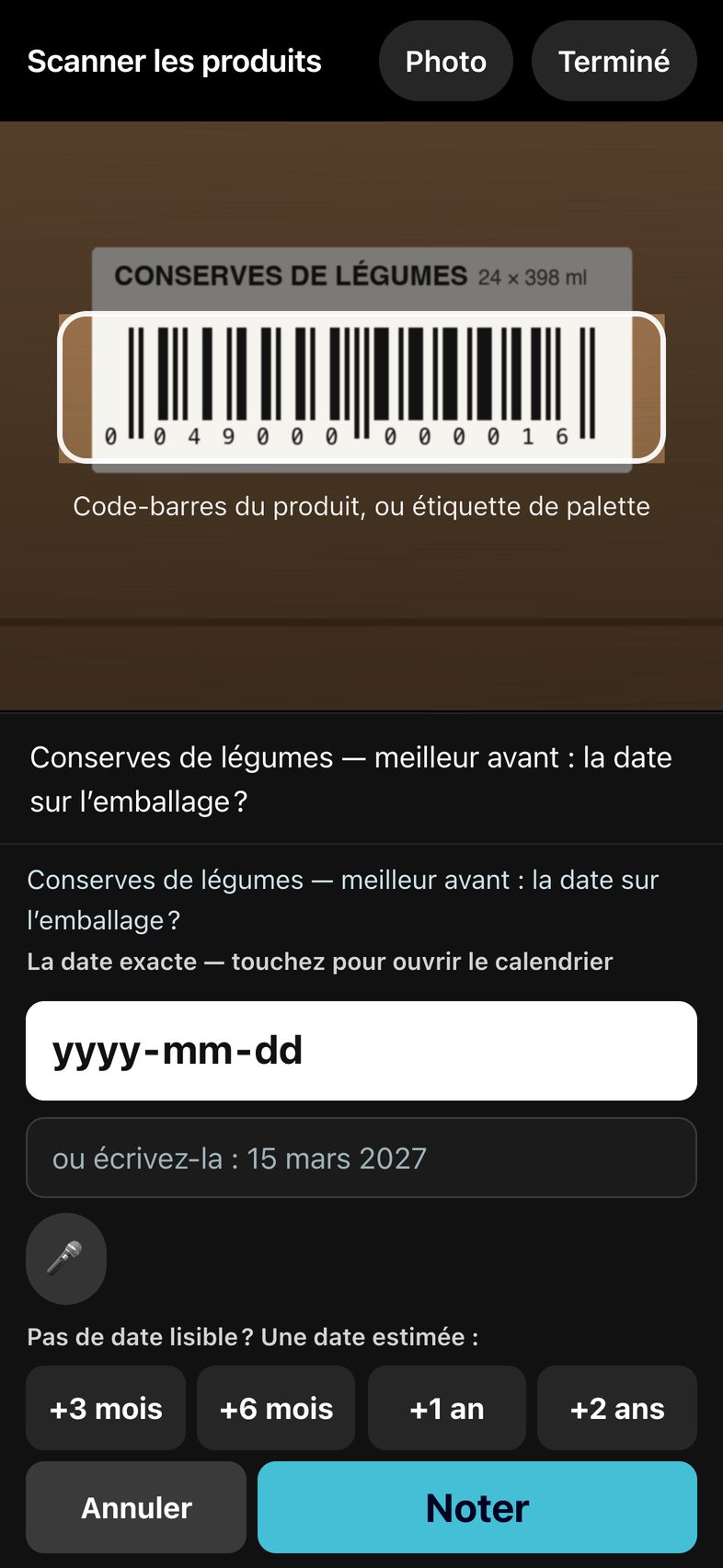
  3. The camera is aimed at the barcode on a can; the application asks for the date on the package, with estimated dates one tap away

    9:05 a.m. · The quantity, the date

    Two questions, and it’s recorded.

    How many, then the date on the package. No readable date? An estimate in one tap: +3 months, +6 months, +1 year.

  4. The Put away screen: for peanut butter, section R-03 is suggested because some is already there

    9:20 a.m. · Putting away

    The application suggests the place.

    Where the same product already is, or in the section for its category. Put it somewhere else? Scan that section.

Everything it does, in detail

Dates and rotation

Nothing expires on the shelf.

Every lot carries its date. The software knows what has expired, what will reach its date within seven days and what has no date.

  • When stock goes out, the lot that expires first leaves first, even if it arrived after the others.
  • “Best before” products stay good for some time after their date: the tolerance grid is set by category.
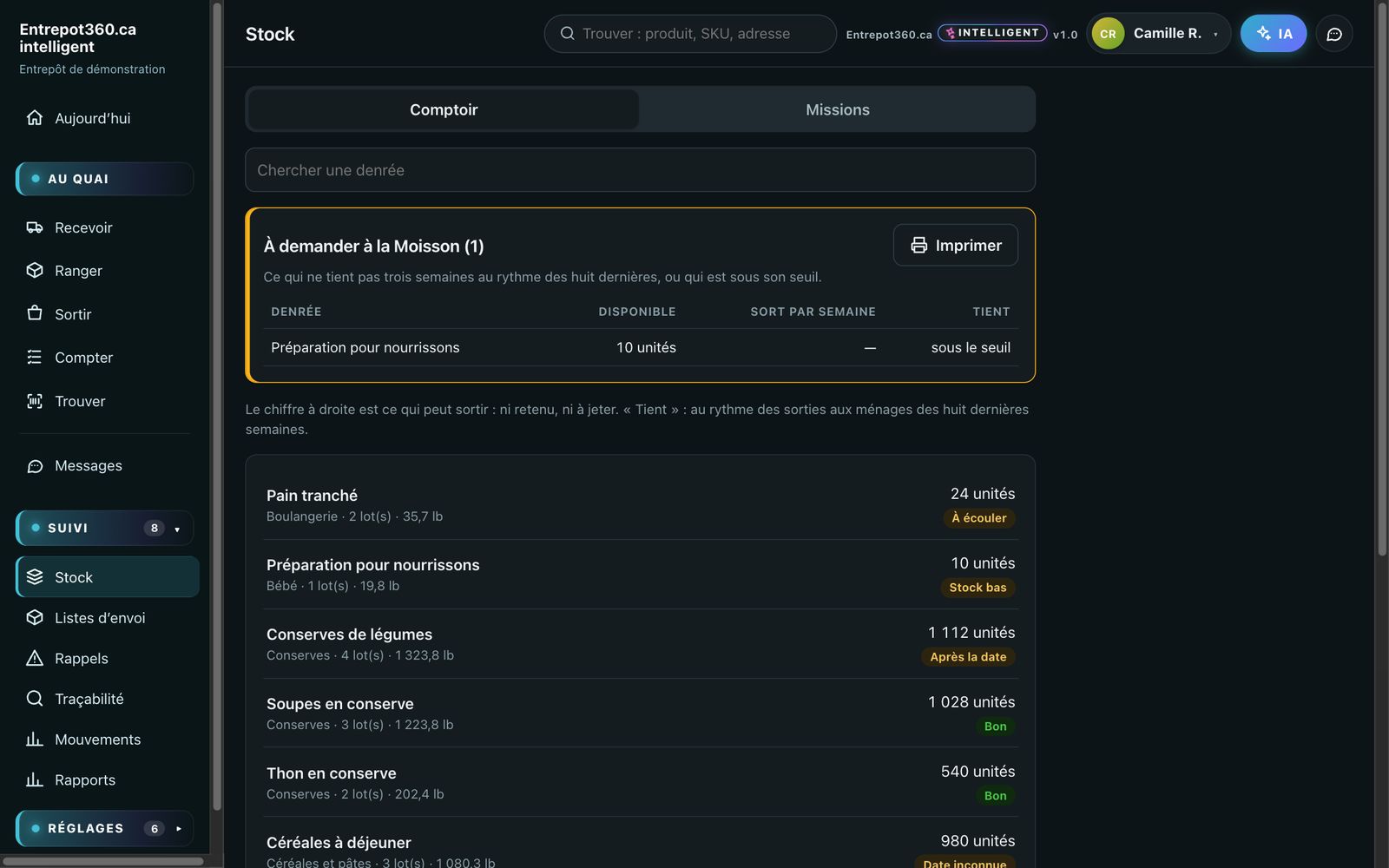
  • A threshold per product: the “to request” list builds itself as soon as stock falls below that threshold.
The Stock screen: each product with its quantity and its status — use soon, low stock, after the date, good

Plan and addresses

Every pallet has its address.

Row, bay, level, position. You enter the measurements of your building and your racks: your warehouse appears on screen, to scale. That is its digital twin, to view as a floor plan or in three dimensions.

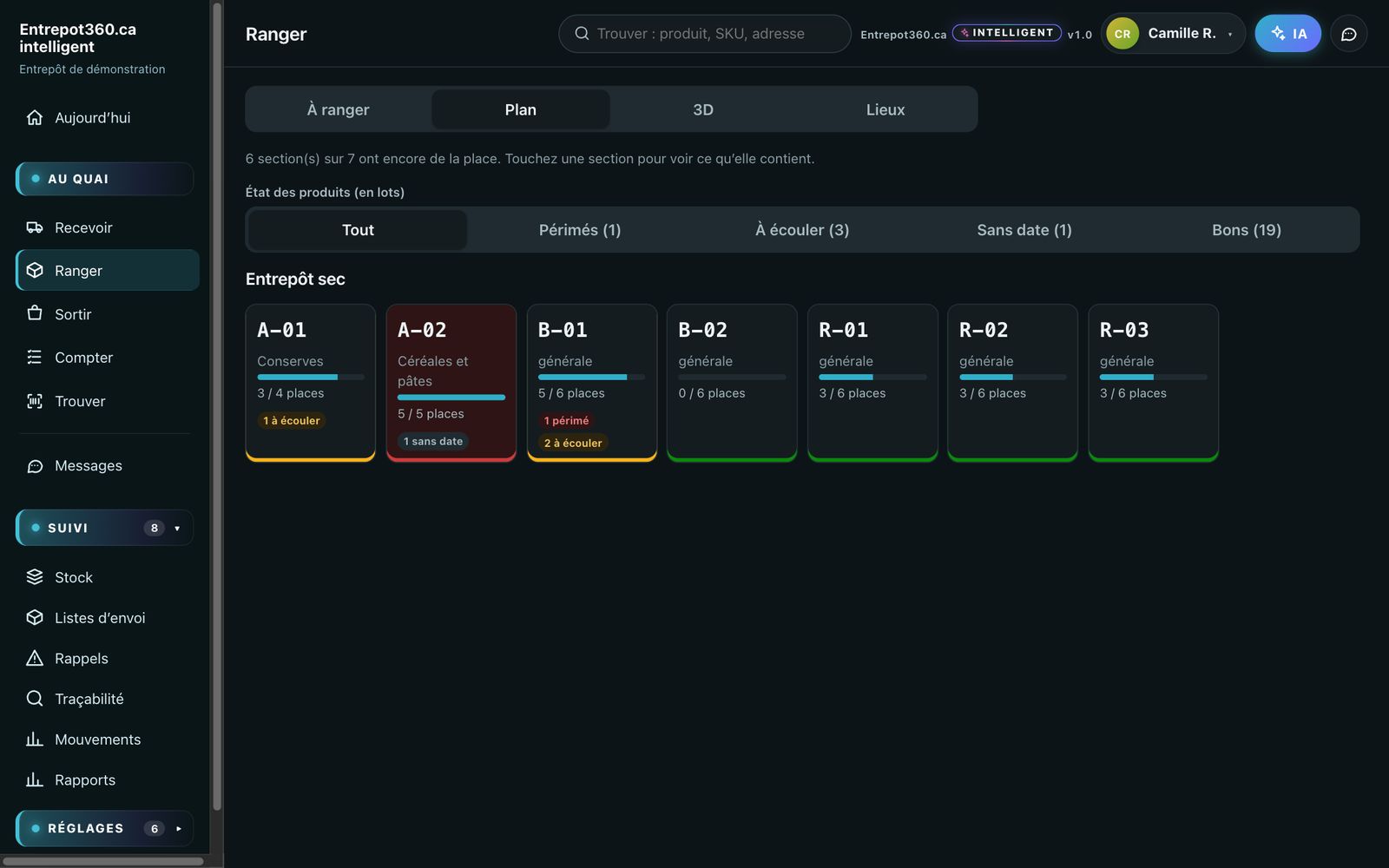
  • How full each section is, and its lots that are expired, to use soon or without a date.
  • A filter by status dims the rest: you see at a glance where to act.
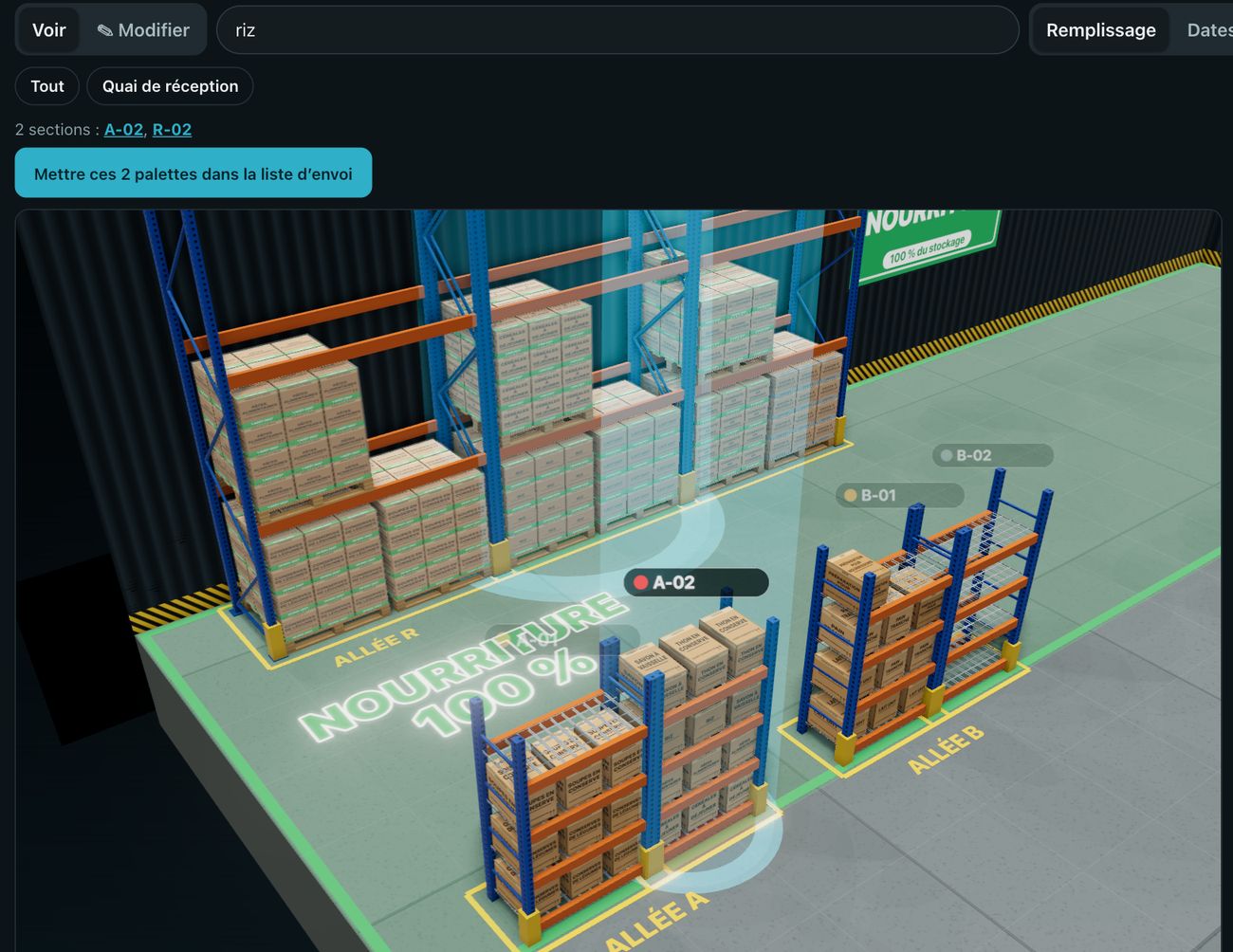
  • “Where is the rice?” — the bays light up.
  • Section and pallet labels to print, ready to scan.
In the digital twin, someone typed “riz” (rice): two sections, A-02 and R-02, light up under a beam of light
Type “rice”: the two sections that hold some light up.

Product status

The state of the whole warehouse, section by section.

Each section shows its dots: expired in red, to use soon in yellow, no date in grey. You choose what goes out by status or by product — the whole pallet follows.

  • Shipping lists prepared pallet by pallet, checked off at the dock.
  • Stock is deducted only on departure, in a single release.
The warehouse plan: seven sections, how full they are, and each one’s lots that are expired, to use soon or without a date

Traceability and recalls

A recall? The answer in one second.

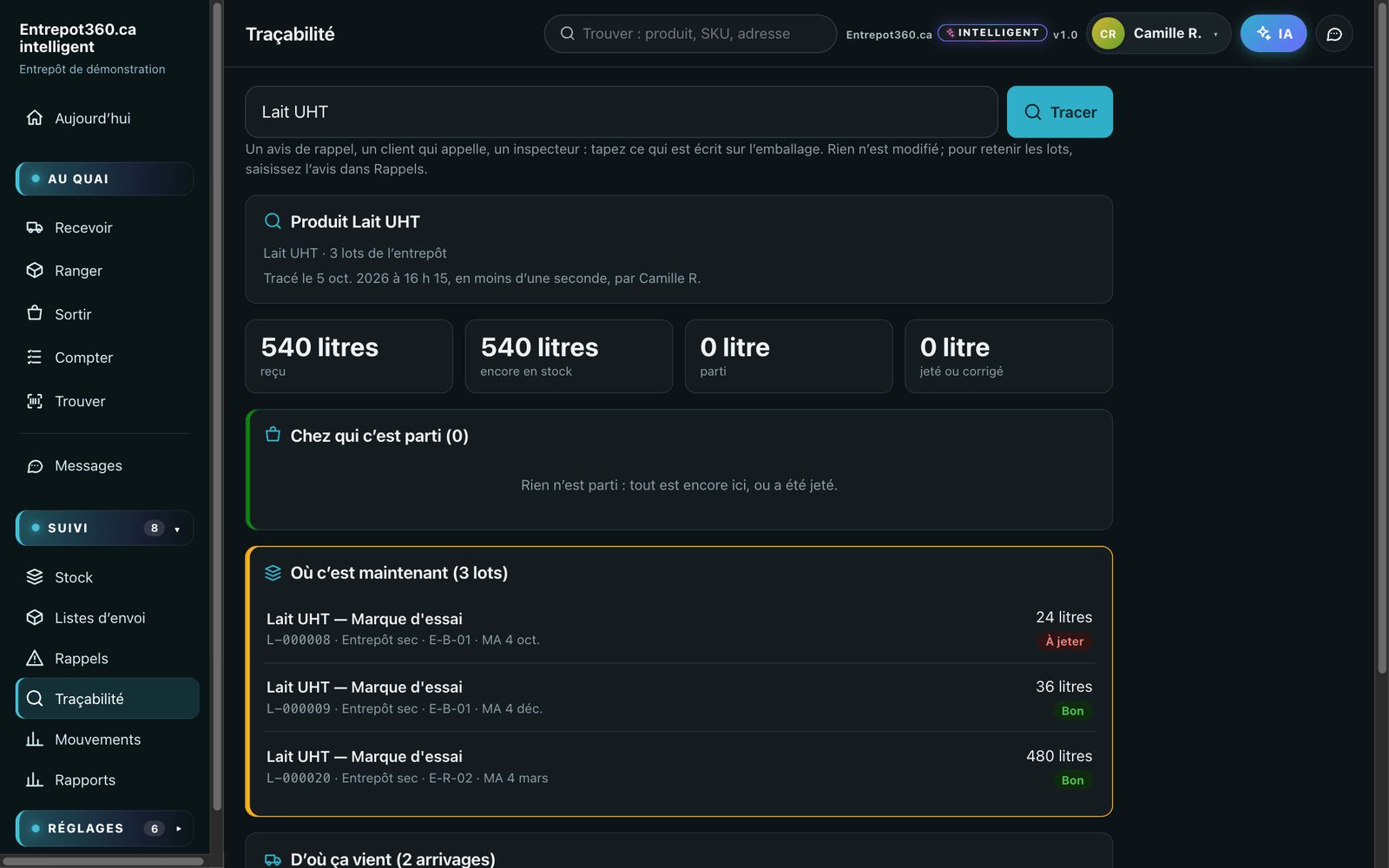
Type what is printed on the package: the software says where the product came from, where it is now, and who it went to.

  • The lots concerned are blocked in one step: they can no longer go out.
  • Every movement is signed and dated. The log is never rewritten.
A product’s traceability: received, still in stock, gone, and the list of lots with their section and their date

Reports

The numbers your board asks for.

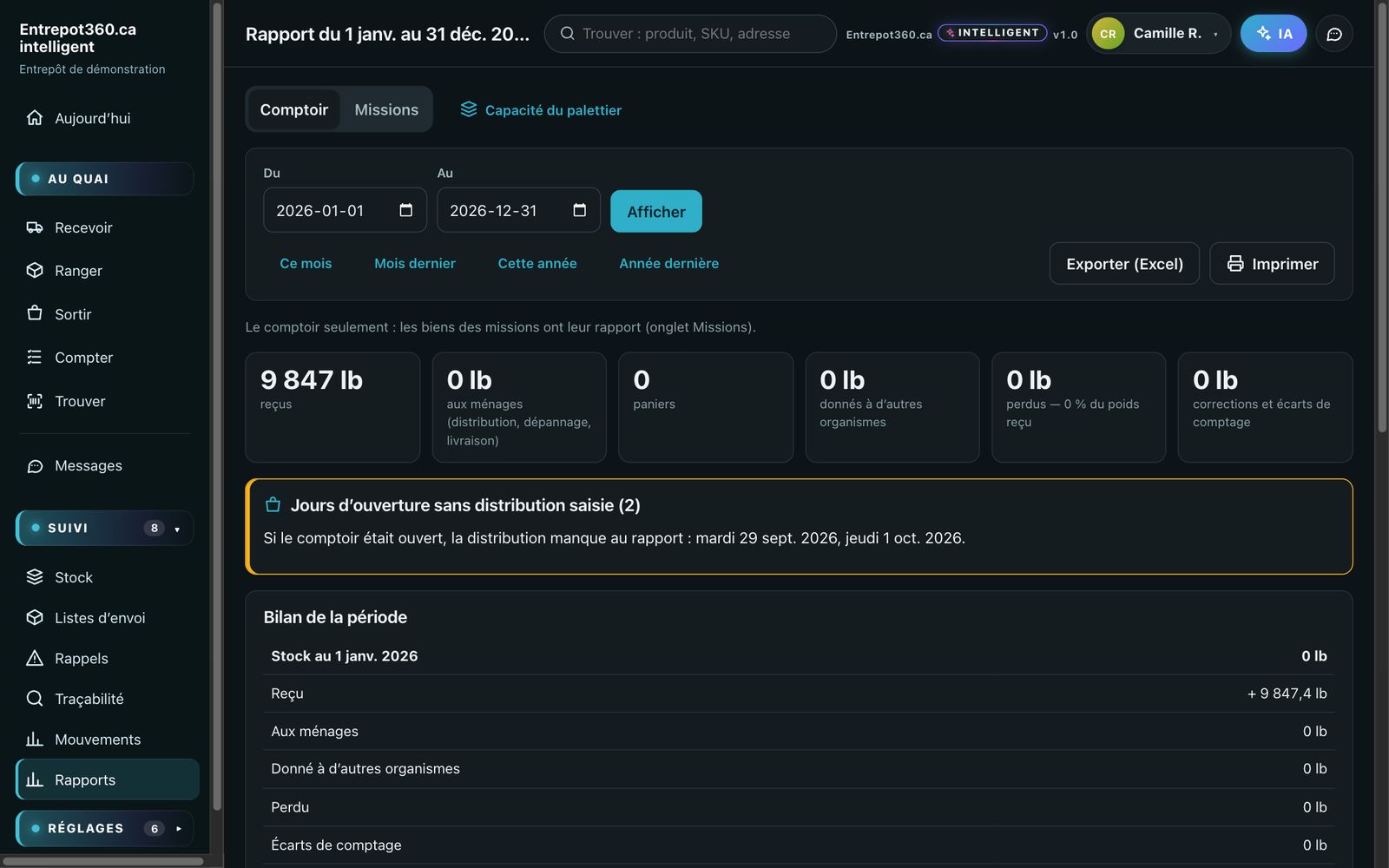
What came in, went out, was given, lost and remains, for the period you want: the month, the year, or any two dates.

  • Exported to Excel, or printed.
  • The summary for the period: opening stock, receipts, releases, closing stock.
  • Cycle counting, one section a week, keeps the numbers accurate.
A year’s report: weight received, given to households, given to other organizations, lost, and the summary for the period

Assistant · optional

Ask your question in plain words.

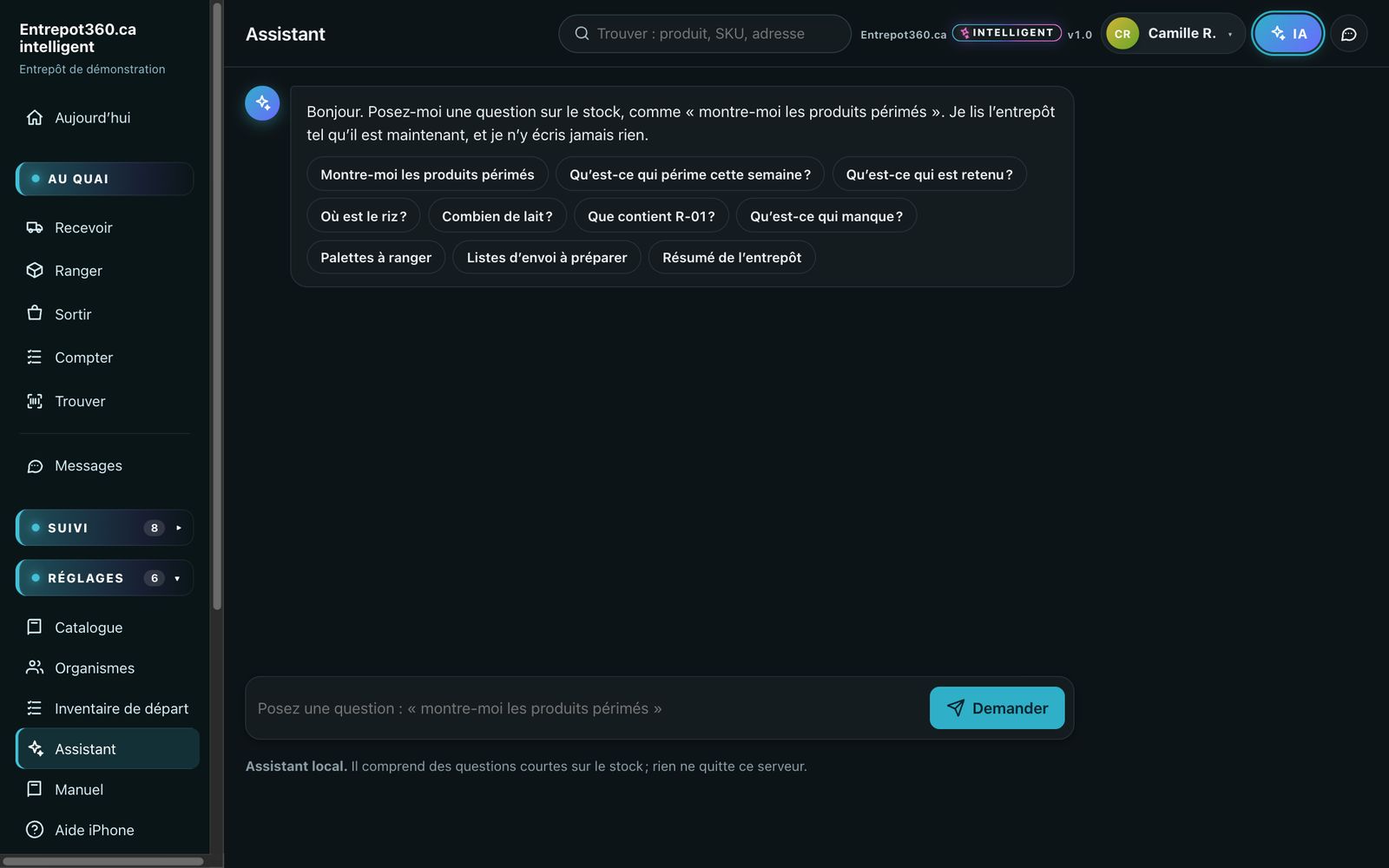
“What expires this week?” “How much milk?” “What is in R-01?” The assistant looks at the stock as it is right now.

  • It never writes to the stock: it answers, you decide.
  • A local assistant is included in every plan; the AI assistant, for free-form questions, is included or optional depending on the plan — the pricing section says which.
  • Each person can turn it on or off on their own device.
The assistant: ready-made questions — expired products, what expires this week, where the rice is, pallets to put away
And also: eight more features
  • A catalogue that fills itselfA barcode never seen before? Its record is looked up online and added to your catalogue.
  • Dictation“Twelve, March 15”: dictate the quantity and the date, even with your hands full. In English or in French.
  • MessagesThe office writes to the dock, the dock reports a problem. Without leaving the application.
  • Guided tourAt first sign-in, each person is guided through their own screens, with video.
  • Several zonesDry, refrigerated, frozen: each zone has its plan, and cold zones have their readings.
  • LabelsSections, pallets, lots: codes to print on an ordinary printer.
  • BilingualEach person chooses their language, on their own device.
  • Updates includedNew features install themselves and are announced on screen. Nothing to reinstall.

Everyone sees what concerns them

Four profiles, four ways into the same warehouse.

At the dock

The warehouse worker

A phone, large buttons, one action at a time. Receive, put away, release, count. Nothing else on the screen.

In the warehouse

The manager

The morning briefing, the stock, the plan, the shipping lists, the recalls. They know where to act before anyone asks.

At the office

Management

The reports, what goes out and to whom, the state of the dates. They choose what goes out, without going down to the warehouse.

In the settings

The administrator

Accounts, the catalogue, thresholds, backups, the log. Everything is set on screen, without a technician.

Who it’s for: food banks, Moisson regional food banks and food pantries

Food banks and Moisson regional food banks

Donations that arrive unannounced, short dates, volunteers who change. The software was designed in the field, in a food bank’s warehouse: it talks about donations, hampers, emergency food aid and shipments, not purchase orders.

Are you a business?

The same software has a view for SMEs: customers, orders, delivery slips, suppliers. See the Food SME or Industrial SME view.

Up and running in three steps

  1. We open your warehouseAn address of your own, a database of your own. You receive your administrator access.
  2. You describe the premisesYour zones, your sections, their measurements. The plan draws itself; you adjust it.
  3. The team scansA starting inventory on the phone, and the guided tour trains each person on their own screens.

Your data stays yours

Frequently asked questions

Do we need to buy barcode scanners?

No. The phone’s camera reads barcodes right in the application: an iPhone or iPad, where everything was fine-tuned, and also an Android phone with Chrome. At the office, a computer and its browser are all you need.

Is there anything to install?

No. Entrepot360.ca opens in the browser, at an address of your own. On an iPhone, you can add it to the home screen: it then opens like an app.

What happens without Internet?

The software is online: it needs Wi-Fi or a cellular connection. After a brief outage, the screen retries on its own when the network comes back.

Our volunteers change often. Does it take long to learn?

The dock profile has only four large buttons and one action per screen. At first sign-in, a guided tour walks each person through their own screens, in a few minutes.

Not all our products have a barcode or a date.

That is covered: you add the line by hand or dictate it, and an estimated date is entered with one tap. Products without a date are tracked separately.

Can we start with the products we have now?

Yes: a starting inventory is done on the phone, section by section. We can also help you get started.

Is there a commitment?

The plan is monthly. A longer commitment earns a discount; it is not required.

Does the AI assistant see our data?

With the AI option, the question and the stock data needed to answer it are sent to the AI provider for the time it takes to answer; the assistant never writes to your data. Without that option, the local assistant answers without anything leaving the server.

About us

Entrepot360.ca was born in a warehouse, not in an office. The software was designed on the floor of a food bank in Québec, with the people who receive the trucks, put away the pallets and prepare the shipments.

Every screen answers a problem met on site: an expired product found too late, a pallet nobody can find, a volunteer who doesn’t know where to put things away. That is why the software is simple at the dock and complete at the office.

Our team is based on Montréal’s South Shore. When you write to us, they are the ones who answer.
  • Designed in QuébecIn the field, with a food bank.
  • Proven every dayBy one of the largest food banks in Québec.
  • Hosted in CanadaYour data stays here.
  • Reachableinfo@entrepot360.ca

What we commit to

See it with your own products

Tell us who you are: we will show you the software and open a trial warehouse in your name. No commitment.

  • A live demonstration, with your questions
  • A trial warehouse in your name
  • An answer from a real person, not a robot

Prefer to write to us directly? info@entrepot360.ca

Our team is based on Montréal’s South Shore.

By sending this request, you agree that we keep your contact details, for twelve months at most, to answer you — nothing else. See our privacy policy (in French).